
Drift & Stability
This page covers the diff half of stepbook's core loop. The Cache makes re-running one step after an edit cheap; diffing tells you what that edit actually changed. Together — edit → cheap re-run → diff — they're what stepbook is for.
A secondary axis, stability, sits further down: when a step is non-deterministic (most llm steps), one output tells you little, so stepbook can sample it repeatedly and measure the variance. Drift compares two runs; stability compares N repeats of one step. You reach for drift constantly; you reach for stability when characterizing a flaky step.
What "drift" means
Every run is snapshotted, so any two runs can be compared structurally instead of by eye. Drift is the set of structural differences between two runs of the same pipeline — computed, not estimated. It's made of two ingredients:
- Field drift — leaf-level differences between two step outputs, walked recursively. Each difference is one of three kinds, reported at a dotted path (e.g.
claims.5.entityType):scalar— the value at that path changed (from→to).added— the path exists in the newer run but not the older.removed— the path existed in the older run but not the newer.
- Assertion flips — a check with the same
namewhose verdict wentpass → failorfail → passbetween the two runs.
A step is identical when it has zero flips and zero field changes and is present in both runs; anything else has drifted. Note what's not here: there's no similarity score or percentage. Drift is just these concrete, countable differences — so "it drifted" always resolves to exactly which fields changed and which assertions flipped.
Drift: comparing runs
Whole-run diff
stepbook diff compares two whole runs — every step's assertion flips and field changes, with a rollup summary:
stepbook diff                          # previous vs latest (defaults)
stepbook diff --from latest-3 --to latest
diff · 9f3c1a2 → e4b7d05
summary: 1 flip · 1 step drift · 2+/0- entities
STEP PRESENCE FLIPS FIELDS STATUS
─────── ──────── ───── ────── ──────
parse both 0 0 same
analyze both 1 3 drift
Assertion flips
[analyze] pass → fail density within target
density=verboseThe summary line rolls up the run: total assertion flips, how many steps drifted, and net entities added/removed (the added/removed field kinds). The table is one row per step — PRESENCE is both unless a step was added or removed between the two runs — and the Assertion flips list spells out every check that changed verdict, with the newer run's reason.
Run selectors are: latest, previous, latest-N, or a timestamp/SHA substring. (all is available for multi-pair diffs in snapshot-diff.)
Single-step snapshot diff
stepbook snapshot-diff <step> (alias sdiff) zooms into a single step's output between two runs:
stepbook snapshot-diff analyze                 # previous vs latest
stepbook snapshot-diff analyze --fields        # per-field drift breakdown
stepbook snapshot-diff analyze --open          # open both in your diff tool
stepbook snapshot-diff analyze --across-last 5 # diff every adjacent pair in last 5 runs
snapshot-diff · step analyze · 9f3c1a2 → e4b7d05
⚠ drift: 1 flip · 3 fields changed
Assertion flips
pass → fail density within target
density=verbose
Field drift
FIELD KIND DETAIL
─────────── ────── ──────────────────────
density scalar "balanced" → "verbose"
longWords.4 added + "thresholds"
longWords.5 added + "configurable"- Assertion flips always print.
--fieldsadds theField drifttable above; without it you get just the⚠ drift: …summary line and a hint to pass--fields. --openopens both snapshots in your external diff tool ($STEPBOOK_DIFF_CMD, defaultcode --diff).--across-last Ndiffs every adjacent pair across the last N runs — useful for spotting when, across a series, a step's output started drifting.
Stability: variance across repeated runs
Everything above compares two given runs. Stability is the secondary axis: it asks a different question — not "what changed between these two?" but "how much does this one step vary when I run it again and again?" It only matters for non-deterministic steps, which in practice means llm ones.
For such a step, a single output tells you little. Run it ten times and you learn a lot: are the outputs basically the same, or all over the place?
stepbook variance <step> (alias var) measures this:
stepbook variance classify -n 10           # re-execute the step 10 times, fresh
stepbook variance classify --across-last 5 # use the last 5 persisted runs instead
stepbook variance classify -n 10 --show-clusters
-n, --runs <N>— fresh sampling: re-execute the step N times right now.--across-last <N>— historical: use the last N persisted runs (default 5) rather than running fresh.--show-clusters— list the identical-output clusters with a representative from each.
How clustering works
Stepbook groups the sampled outputs into clusters of similar outputs and flags outliers. The default similarity is a built-in textual metric (cosine similarity over tokenized output). Conceptually:
- Each sample is compared pairwise to the others.
- Samples that are highly similar collapse into a cluster.
- A sample whose mean similarity to the cohort falls below a threshold is flagged as an outlier.
The outlier threshold defaults to 0.6 and is configurable per step via outlierThreshold on the step definition:
export default defineStep({
  name: 'classify',
  type: 'llm',
  outlierThreshold: 0.75, // stricter — flag more samples as outliers
  runner: async (input, ctx) => callModel(input),
})
A step with one dominant cluster and no outliers is stable. A step with several clusters of similar size is telling you the output isn't determined by the input — worth investigating before you rely on it.
Custom similarity with --embed
The default similarity is textual. For semantic similarity, you can supply an embedder. With --embed, stepbook clusters using an embed function exported from your pipeline.ts:
stepbook variance classify -n 10 --embed         # threshold defaults to 0.85
stepbook variance classify -n 10 --embed 0.9     # custom cosine threshold
This compares outputs by embedding-vector cosine similarity rather than token overlap — better for "these say the same thing in different words."
In the dashboard
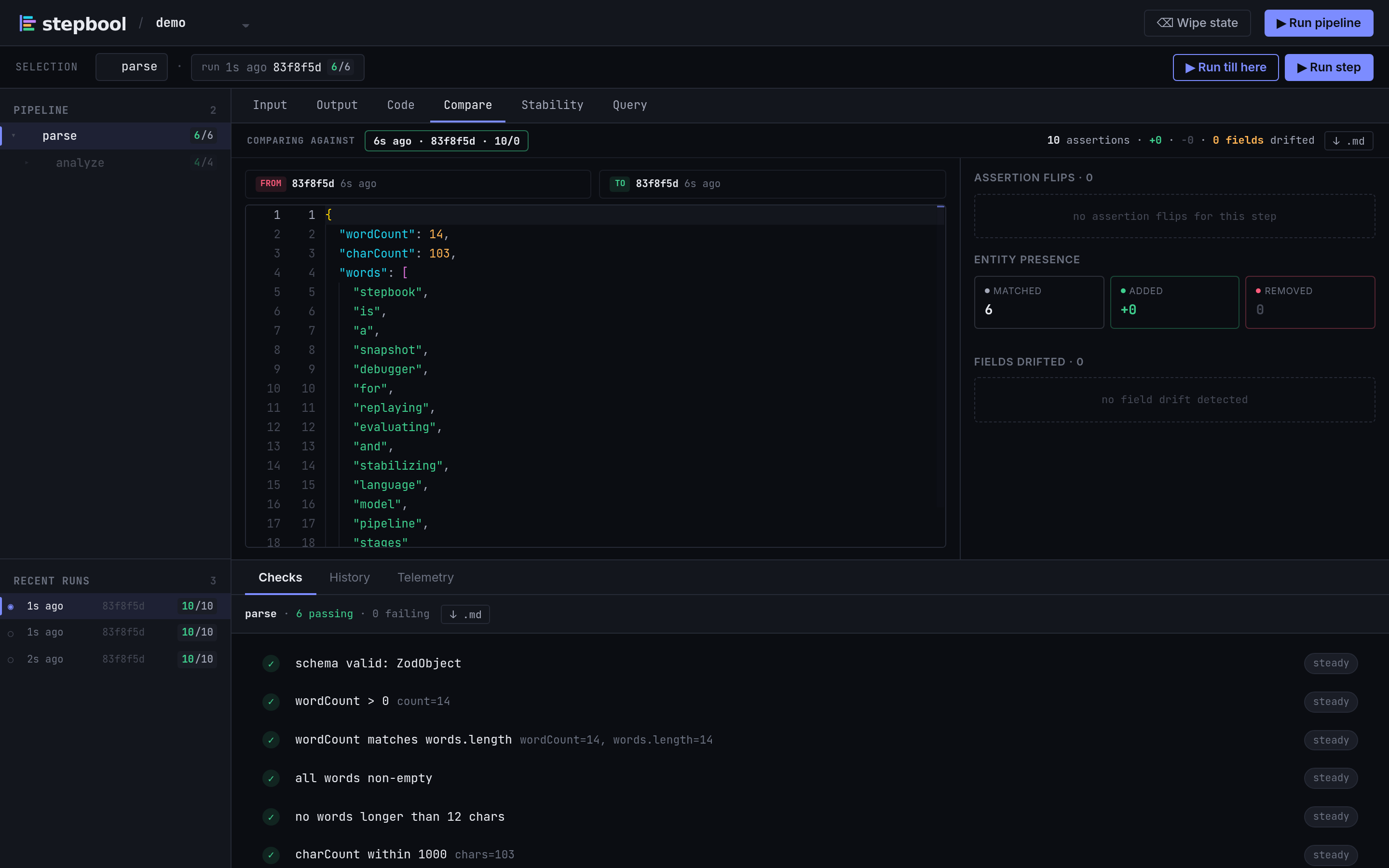
The Stability panel runs the same analysis interactively: pick a step, choose fresh or historical sampling, and see the clusters, outliers, and per-sample detail. The Compare panel is the visual counterpart to diff / snapshot-diff — assertion flips, entity-presence summary, and field-drift breakdown in one view:
See The Dashboard for the full panel walkthrough.
When to reach for which
| Question | Tool |
|---|---|
| Did my edit change this step's output? | snapshot-diff <step> |
| Did anything flip across the whole run? | diff |
| How consistent is this step run-to-run? | variance <step> -n 10 |
| Has this step been drifting over the last N runs? | snapshot-diff --across-last or variance --across-last |
| Are two semantically-equal outputs being counted as different? | variance --embed |