
Getting Started
This page gets you from zero to a running pipeline and an open dashboard.
Prerequisites
- Node.js ≥ 20. Stepbook is ESM-only and uses modern Node APIs.
- Familiarity with TypeScript. Steps are
.tsfiles.
Scaffold a project
Scaffold a new project without installing anything — npx fetches the CLI on demand:
mkdir my-pipeline && cd my-pipeline
npx @stepbook/cli init   # stepbook.config.json + a starter step + a sample input
Then add stepbook to the project as dev dependencies. The CLI drives the loop; your steps import defineStep from @stepbook/runner and validate with zod, so you need all three:
npm install -D @stepbook/cli @stepbook/runner zodNow run the loop through the locally-installed binary with npx stepbook:
npx stepbook run          # execute the pipeline against the canonical input
npx stepbook check        # re-assert the last run (CI-friendly)
npx stepbook dashboard    # open the inspector at http://127.0.0.1:6125
Shorter commands
Add a script so you can drop the npx prefix — "scripts": { "stepbook": "stepbook" } lets you run npm run stepbook -- run. The rest of this guide writes bare stepbook <cmd>; that's the locally-installed bin, via npx stepbook or a script.
stepbook run with no input uses the project's canonical input (the first file in inputs/, or the one named by canonicalInput in the config).
Explore the bundled demo
Prefer to poke at a working pipeline (and stepbook's own source) first? Clone the repo and run the bundled demo:
git clone https://github.com/nikita-kramarovsky/stepbook
cd stepbook
npm install
npm run dev    # dashboard at http://127.0.0.1:6125 against examples/demo
npm run dev starts the dashboard pointed at examples/demo — a minimal two-step deterministic pipeline (parse → analyze). If port 6125 is taken, it falls through to the next free port.
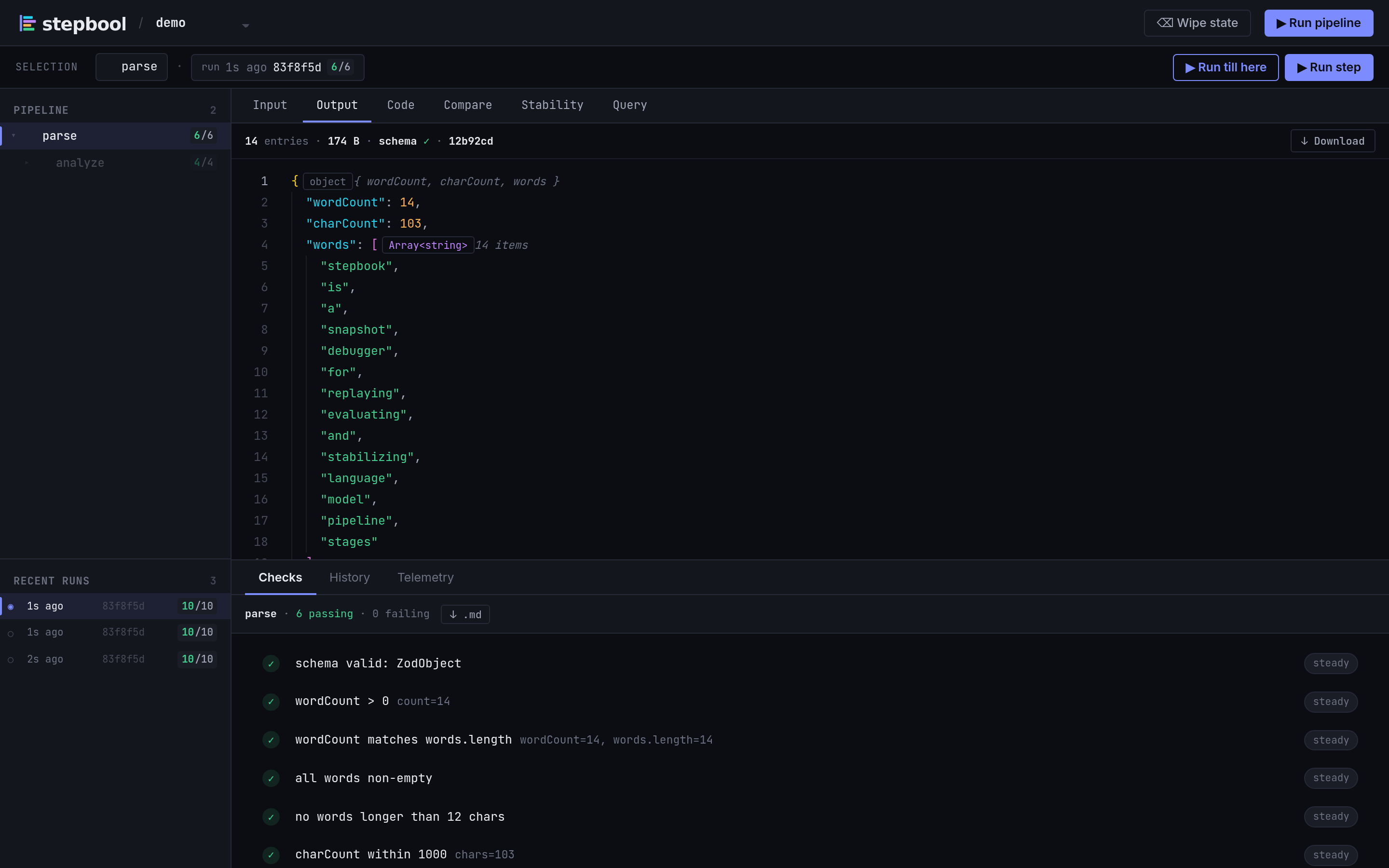
Your first pipeline
A pipeline is made of two kinds of file: units (steps) and a pipeline entrypoint that composes them. Let's build the parse → analyze demo by hand.
A unit is the default export of a *.step.ts file. Its name is inferred from the filename and type defaults to 'derive'; defineStep returns a plain callable you can invoke elsewhere:
// steps/parse.step.ts
import { z } from 'zod'
import { defineStep } from '@stepbook/runner'

export type ParseInput = { text: string }
export type ParseOutput = { wordCount: number; words: string[] }

export default defineStep<ParseInput, ParseOutput>({
  type: 'parse',
  schema: z.object({ wordCount: z.number().int(), words: z.array(z.string()) }),
  runner: async (input) => {
    const words = input.text.trim().split(/\s+/).filter(Boolean)
    return { wordCount: words.length, words }
  },
})// steps/analyze.step.ts
import { z } from 'zod'
import { defineStep } from '@stepbook/runner'
import type { ParseOutput } from './parse.step'
export type AnalyzeOutput = { density: 'concise' | 'balanced' | 'verbose' }
export default defineStep<ParseOutput, AnalyzeOutput>({
schema: z.object({ density: z.enum(['concise', 'balanced', 'verbose']) }),
runner: async (input) => {
const ratio = input.words.filter((w) => w.length >= 5).length / input.wordCount
return { density: ratio < 0.2 ? 'concise' : ratio < 0.4 ? 'balanced' : 'verbose' }
},
assertions: (o) => [
{ name: 'density is known', pass: ['concise', 'balanced', 'verbose'].includes(o.density) },
],
})The pipeline entrypoint is the default export of pipeline.ts. Its runner is what stepbook run executes — it composes the units in code by calling them. There's no deps and no separate wiring: the data flow is the code. Because the units are imported, the calls are fully typed end to end.
// pipeline.ts
import { definePipeline } from '@stepbook/runner'
import parse, { type ParseInput } from './steps/parse.step'
import analyze from './steps/analyze.step'

export default definePipeline({
  name: 'demo',
  runner: async (input: ParseInput) => {
    const parsed = await parse(input)   // first-class node: "parse"
    return analyze(parsed)              // first-class node: "analyze"
  },
})
Finally, stepbook.config.json names the pipeline, points at your step files, and names the entrypoint:
{
  "name": "demo",
  "steps": ["steps/**/*.step.ts"],
  "pipelineFile": "pipeline.ts"
}
Now run it:
stepbook runrun executes the entrypoint runner and records a trajectory — a tree in which every unit call is a first-class node with its own input, output, checks (the unit's own schema and assertions run per call), telemetry, and cache entry. A unit that runs once is keyed by its bare name (parse); a unit called repeatedly — say each turn of an agent loop — is keyed decide#0, decide#1, and so on. See Steps & Step Types for the full anatomy of a unit.
Composing units two ways
import parse from './steps/parse.step'; await parse(input) is the recommended, fully-typed form. When you need to pick a unit dynamically — common in an agent loop — there's an untyped escape hatch: await ctx.run('parse', input), where ctx is the runner's second argument. A pipeline calls units in a line; an agent calls them in a loop — same model.
Add more units with:
stepbook add-step extract --type llm
stepbook add-step summarize --type derive
Run a unit in isolation
Any *.step.ts file can export cases — Storybook-style named inputs — so you can exercise one unit on a fixed input without running the whole pipeline:
// steps/parse.step.ts — alongside the default export
export const Short = { input: { text: 'hello world' } }stepbook run --just parse --case ShortThe inner loop
Day to day, you cycle through a handful of commands:
stepbook run                              # execute, snapshot, cache
stepbook diff                             # what changed vs the previous run
stepbook check                            # re-run assertions, exit non-zero on failure
stepbook q analyze "select: density"      # query a unit's output (YAML → JSONata)
The core of it is two commands working together. Edit a unit and run — because the cache is keyed on each unit's input and its source hash, only the unit you touched (plus any unit whose input changed as a result) re-executes; everything else replays from cache. Then diff shows you exactly what your edit changed in the output. Edit → cheap re-run → diff is the loop stepbook is built around; check and q are how you assert and inspect along the way. See The Cache and Drift & Stability.
Where to go next
- Project Structure — what each file and directory does.
- StepQL — the YAML query language
stepbook quses. - Steps & Step Types — the building block in depth.
- The Cache — how stepbook decides what to re-run.
- CLI Reference — every command and flag.